What’s new
The Custom Variant Annotation Filter enables you to:
- Apply annotation-based filters to subset samples directly in the Study View filtering panel.
- Combine filters with AND/OR logic to build precise selection criteria (for example: samples with variants annotated as pathogenic AND with specific functional scores).
This means that instead of relying only on broad genomic categories, you can now leverage your own annotation schema to define sample subsets with variants that match your research hypothesis.
Take a look at the test case on our demo server here.
Why this matters
In cancer genomics, not all variants have equal impact on cancer biology. While cBioPortal already lets you explore somatic mutations, copy number changes, and rearrangements across cohorts, understanding which alterations matter for your research question often relies on custom annotations — labels denoting biological features such as mutation impact, functional class, or other curated information. cBioPortal allows custom annotations to be added to data tables via custom namespace columns, but filtering on these annotations in Study View wasn’t flexible enough for tailored cohort exploration. The client, a cancer diagnostics company, needed this flexibility and sponsored the development needed to address this: the new Custom Variant Annotation Filter, approved by the cBioPortal community, built by The Hyve, and now available for all to use.
How it works in practice
To see this feature in action, head over to our Test Study with Custom Variant Annotations on The Hyve’s demo cBioPortal. This study already includes four custom variant annotations you can explore using the new filter.
Custom variant annotations are loaded into the portal via the custom namespace columns — just as before — for mutations, copy number, or structural variants. Once available in a study, the new filter UI lets you:
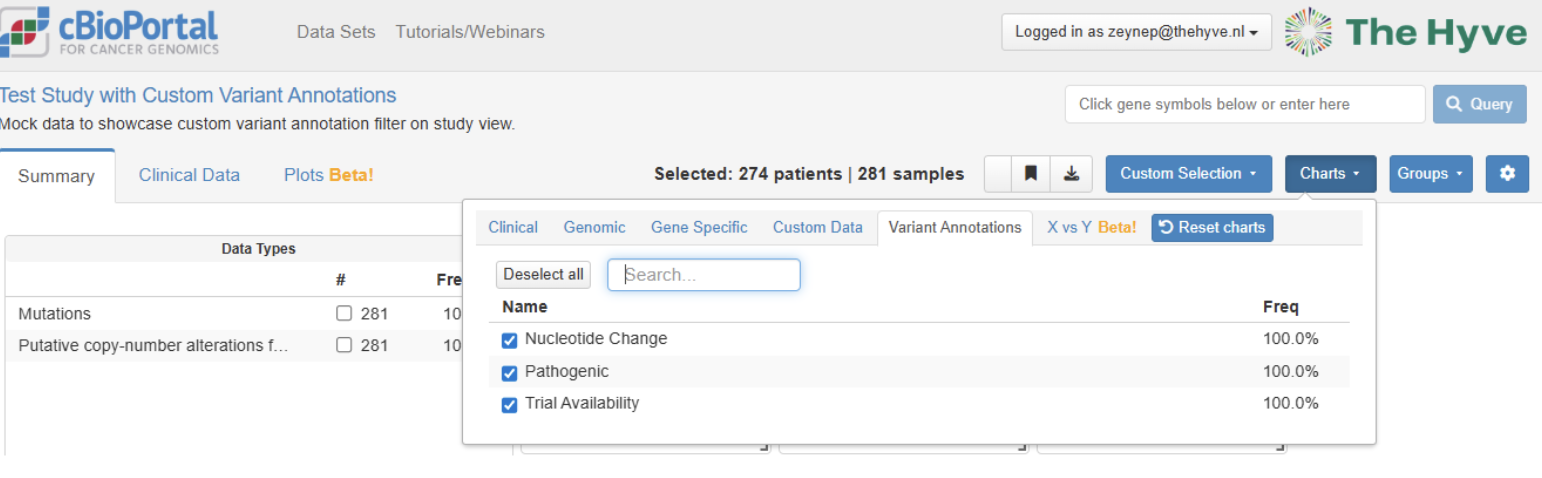
- Add new charts to the Study View showing sample level statistics for the custom variant annotations via the Charts dropdown. In the test study there are 3 such annotation categories – Nucleotide change, pathogenicity and trial availability:
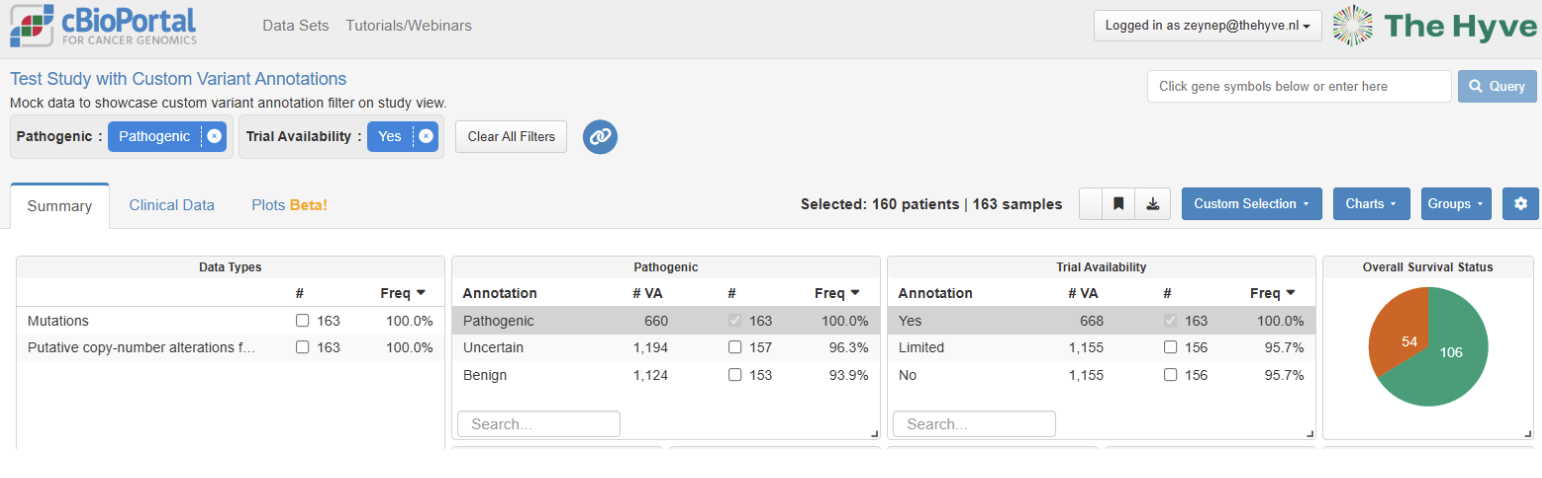
- Choose specific annotation values or ranges depending on the data type. For instance, samples carrying a variant classified as pathogenic and samples that have a clinical trial available based on the genomic variants:
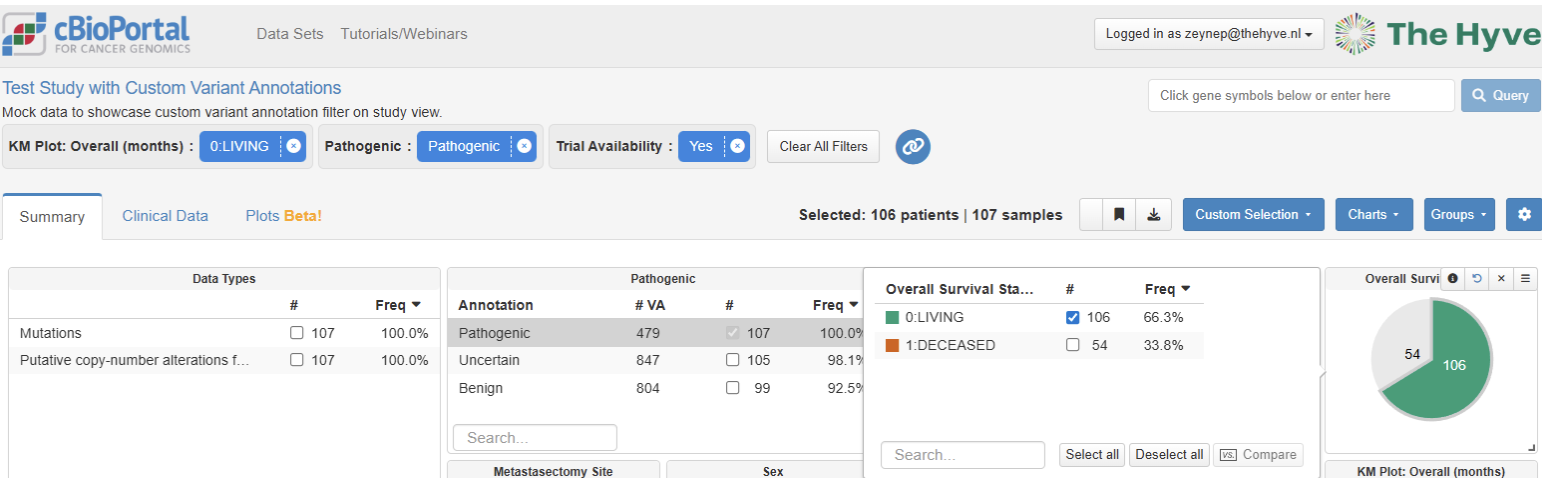
- Combine multiple annotation filters using logical operators (AND / OR) to refine selection.
- Continue analysis in cBioPortal with the filter applied.
Technical implementation
This functionality was implemented through coordinated backend and frontend updates to cBioPortal:
- Backend API and Study View filtering support: Adds new endpoints and logic to fetch namespace attributes and integrate them into Study View filtering mechanics.
- Frontend filter UI enhancements: Bring the custom annotation filter controls into the Study View interface, enabling users to build and apply annotation filters with clear logical combinations.
These changes were merged into the main cBioPortal repositories, enabling community-wide access.
Wrapping up
The Custom Variant Annotation Filter brings more analytical precision to cBioPortal’s Study View, helping researchers ask richer, biologically informed questions without leaving the portal. Whether you’re probing variant drivers, functional impacts, or bespoke annotation schemas, this feature makes your cohort exploration more targeted and repeatable.
Stay tuned for more updates as we continue to enhance cBioPortal’s capabilities to support cutting-edge cancer genomics research.